 John M. Wargo
Eleventy Require Not Defined in ES Module Scope

Posted: Sunday, January 11, 2026 at 07:13 AM | Categories: Eleventy
Links On This Page
As I described in Eleventy Adding Page Links to a Post, I published a new Eleventy plugin yesterday that delivers a shortCode that generates a list of links from the current page. When I built the plugin, I built it using Eleventy 3.12.
After publishing the plugin, I tried to implement it on this site but the site crashed and burned (wouldn't build). I suddenly remembered that I never completed this site's upgrade to Eleventy 3.x. I upgraded all of my other sites, but for this one I kept running into module problems, so I reverted it to Eleventy 2.x.
Well, I had this shiny new plugin I wanted to put to work, so I had to figure this out. I went through all of the steps and still bumped up against module problems.
Here's what I did:
- Added
type: moduleto mypackage.jsonfile. - Changed all my
requires toimports - Changed all my plugins to
export default function() {} - Upgraded all my packages to the latest versions (I did this late in the process after I couldn't get this to work any other way), just in case.
Every time I tried to build the site, I received a variant of the following error:
[11ty] Eleventy Fatal Error (CLI):
[11ty] 1. Error in your Eleventy config file 'eleventy.config.js'. (via EleventyConfigError)
[11ty] 2. There was a problem importing 'eleventy.config.js' via import(esm) (via EleventyImportError)
[11ty] 3. require is not defined in ES module scope, you can use import instead
[11ty] This file is being treated as an ES module because it has a '.js' file extension and 'D:\dev\11ty\johnwargo\package.json' contains "type": "module". To treat it as a CommonJS script, rename it to use the '.cjs' file extension. (via ReferenceError)
I've tried changing the Eleventy config to eleventy.config.cjs as suggested, but then I get a different error (I didn't save it). Changing it to a .mjs extension doesn't make it any better.
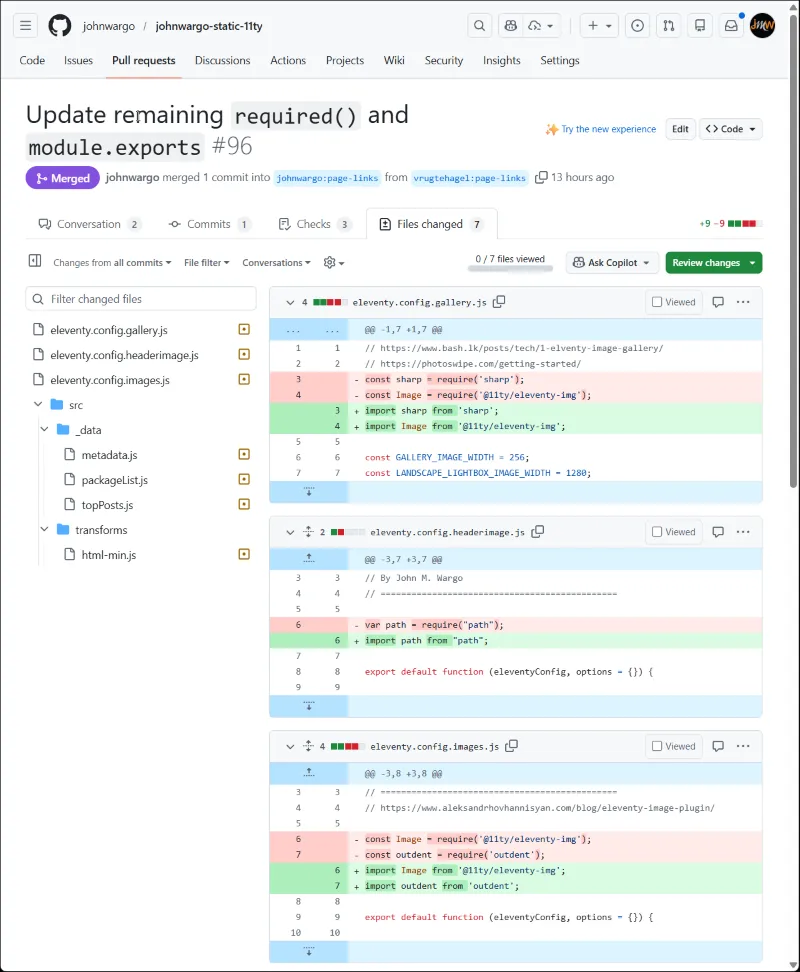
Having spent one or more hours on this, I decided it was time to ask the experts over on the 11ty Discord. Member uncenter quickly pointed out that I was probably still using require somewhere in the site (I didn't think I was, but I was wrong). Member vrutehagel even went ahead and found all the instances I'd missed and fixed them in a pull request; simply amazing.
Replacing require with import
Be thorough when upgrading an Eleventy site to version 3, you must fix all of your code's use of require. Not only must you change how you load modules included with your project, you must also replace each module's use of require as well - as shown in the image below.
What I'd done, likely multiple times as I tried to make this work, was fix the modules/plugins I'd written (or borrowed from other sites), but I missed fixing any of my code-based Global Data Files and I definitely missed fixing require statements used within the site's modules.
That was a huge miss for me and cost me a lot of time.
Here are some examples from the PR:
Next Post: Added Eleventy-Fetch to the Site
Previous Post: Eleventy Adding Page Links to a Post
Header image: Eleventy Project Home Page.