 John M. Wargo
Eleventy Require Not Defined in ES Module Scope

Posted: Sunday, January 11, 2026 at 07:13 AM | Categories: Eleventy
Links On This Page
As I described in Eleventy Adding Page Links to a Post , I published a new Eleventy plugin yesterday that delivers a shortCode that generates a list of links from the current page. When I built the plugin, I built it using Eleventy 3.12.
After publishing the plugin, I tried to implement it on this site but the site crashed and burned (wouldn't build). I suddenly remembered that I never completed this site's upgrade to Eleventy 3.x. I upgraded all of my other sites, but for this one I kept running into module problems, so I reverted it to Eleventy 2.x.
Well, I had this shiny new plugin I wanted to put to work, so I had to figure this out. I went through all of the steps and still bumped up against module problems.
Here's what I did:
- Added
type: moduleto mypackage.jsonfile. -
Changed all my
requires toimports - Changed all my plugins to
export default function() {} - Upgraded all my packages to the latest versions (I did this late in the process after I couldn't get this to work any other way), just in case.
Every time I tried to build the site, I received a variant of the following error:
[11ty] Eleventy Fatal Error (CLI):
[11ty] 1. Error in your Eleventy config file 'eleventy.config.js'. (via EleventyConfigError)
[11ty] 2. There was a problem importing 'eleventy.config.js' via import(esm) (via EleventyImportError)
[11ty] 3. require is not defined in ES module scope, you can use import instead
[11ty] This file is being treated as an ES module because it has a '.js' file extension and 'D:\dev\11ty\johnwargo\package.json' contains "type": "module". To treat it as a CommonJS script, rename it to use the '.cjs' file extension. (via ReferenceError)
I've tried changing the Eleventy config to eleventy.config.cjs
as suggested, but then I get a different error (I didn't save it). Changing it to a .mjs
extension doesn't make it any better.
Having spent one or more hours on this, I decided it was time to ask the experts over on the 11ty Discord. Member uncenter
quickly pointed out that I was probably still using require
somewhere in the site (I didn't think I was, but I was wrong). Member vrutehagel
even went ahead and found all the instances I'd missed and fixed them in a pull request; simply amazing.
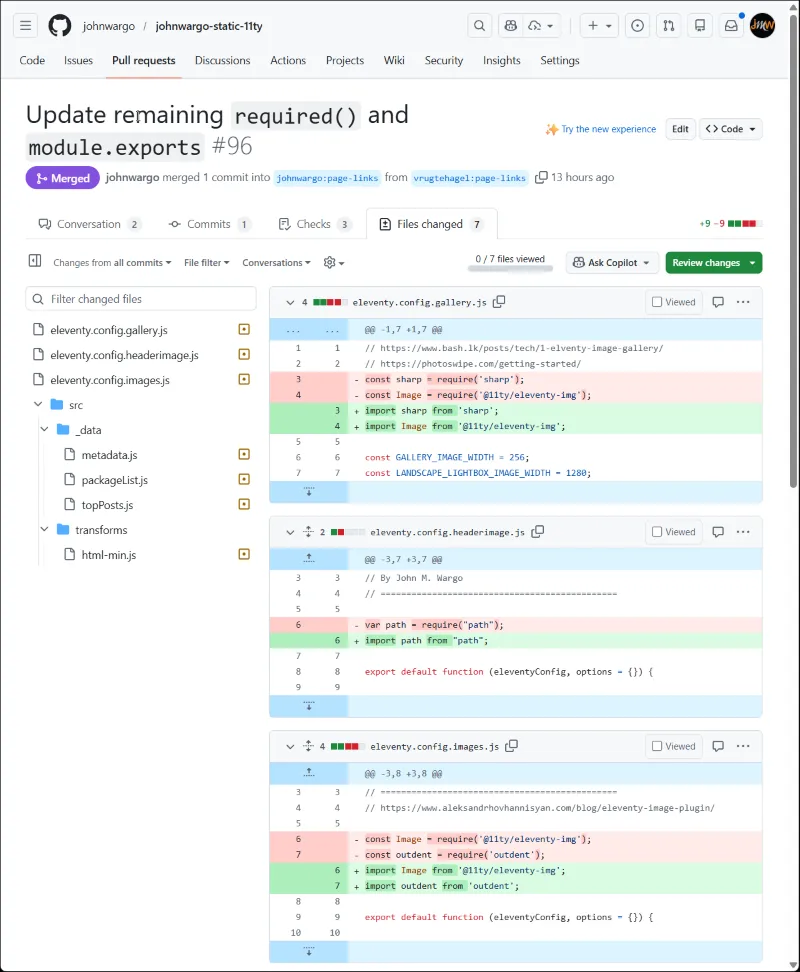
Replacing require with import
Be thorough when upgrading an Eleventy site to version 3, you must fix all of your code's use of require
. Not only must you change how you load modules included with your project, you must also replace each module's use of
require as well - as shown in the image below.
What I'd done, likely multiple times as I tried to make this work, was fix the modules/plugins I'd written (or borrowed from other sites), but I missed fixing any of my code-based
Global Data Files and I definitely missed fixing
require statements used within the site's modules.
That was a huge miss for me and cost me a lot of time.
Here are some examples from the PR:
Previous: Added Eleventy-Fetch to the Site Next: Eleventy Adding Page Links to a Post
Header image: Eleventy Project Home Page.